Payments - Accessing Payments

Introduction to the Payment Window

There are several ways to access the payment window in Theatre Manager. Payments can be created for new orders or added to existing orders. In a new ticket order the Payment button can be selected from the Order window. In a Membership or Donation order the Payment button at the top of the window will open an order window in the Payment view. When a payment needs to be added to an existing order the Order tab or Payment tab can be selected in the patrons record. The order can be locate using the corresponding order number. Select the order. Click the open button. The Payment tab will open directly to the Payment view. The Order tab will require the Payments button be clicked for the Payment view to be accessed.
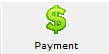
The payment window is used to record the payment method, enter a reason why the patron purchased the tickets, initiate invoicing, print tickets, and record detailed order notes. Each time tickets are sold, a donation is made or a membership purchase a unique Order Number is created. This number is displayed on the title bar of the Payment Window. For more information on the Payment Window click here.